How to optimise a blog post for SEO (our 15-step checklist)
So, you've written a blog. Sweet.
Now it needs the best chance of ranking from day one, for the right searches. So we do a few things before anyone hits publish. Same 15 steps on every client post. Every time.
The short version: research the question, answer it early, make it easy to read, add what only you know, link it up and sort the title, URL and images. Then keep it updated.
If you're still deciding whether blogging's worth the effort in the first place, start with does blogging actually help SEO?
Before you write
1. Find the questions people are actually asking
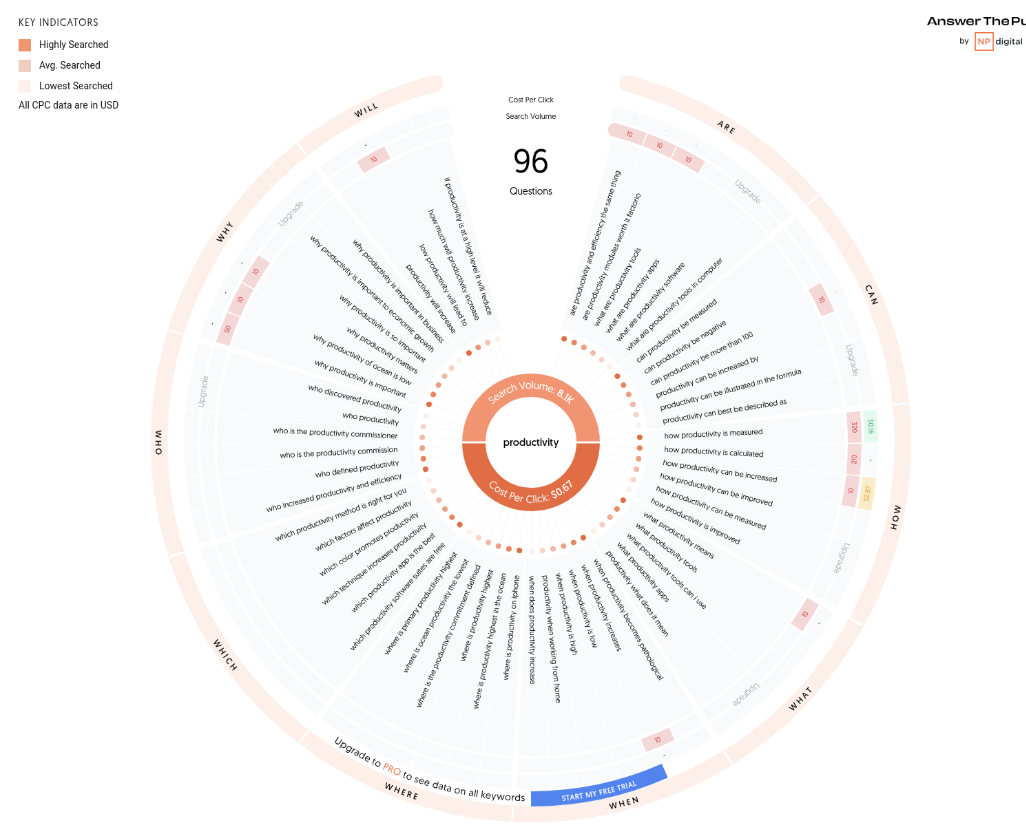
Before I touch a keyword tool, I go to AnswerThePublic and type in a problem or solution related to the service.
If I were a wedding photographer, I'd type in "wedding photography". It spits out a map of the questions people are asking around it, which is where most of our blog ideas start. The free version gives you 3 searches a day.
Google's own autocomplete and its "People also ask" box are free as well, and they show you what real people type.
2. Check the keyword (and don't panic about search volume)
Next, run those ideas through a keyword tool. I use SE Ranking because it's good value for what you get. If you're just dipping a toe in, a free Ubersuggest account gives you 3 searches a day, which is enough for one topic if you plan them.
Yes, high search volume with low competition is the dream. It's also rare. Don't let a low number, or even a zero, put you off. We've had clients pull in traffic from keywords showing zero monthly searches, because they were so specific to the niche that the right people found them anyway.
The volume figures in these tools are estimates anyway, so treat them as a rough guide.
3. Look at what's already ranking
Found a keyword you like? Google it in an incognito window, so your own search history doesn't skew the results, and look at the top 5.
If they're blog posts and guides, a blog post can compete.
If they're service pages or shops, Google's decided that search is for buying, and a blog probably won't rank for it.
While you're there, read them. What do they all cover? What have they missed? What could you add that they can't, like your own client results or an opinion they wouldn't dare post?
That's how our post on whether blogging helps SEO got written. I read what was on page one, then wrote the version only we could, with our own client numbers in it.
4. Outline it before you open a blank doc
Sit down with an empty Google Doc and hope for inspiration, and you'll end up with 800 words of rambling that could have been one Instagram caption.
Decide the one thing you want the reader to walk away with. Then write your headings before you write a single paragraph. If a heading doesn't help answer the question, it doesn't go in.
Fair warning. Done properly, this takes about 3 hours a post. If you'd rather hand it over, it's the exact process we run for clients. See our blog writing packages
While you write
5. Answer the question in a short, punchy intro
Featured snippets (the answer box at the top of Google) and AI tools like ChatGPT and Google's AI Overviews both lift the clearest answer they can find. Give them one early, in a sentence or two, before the stories and the detail. Keep the intro itself tight: very short sentences, 8 lines or fewer, and paragraphs of 1 to 3 lines near the top.
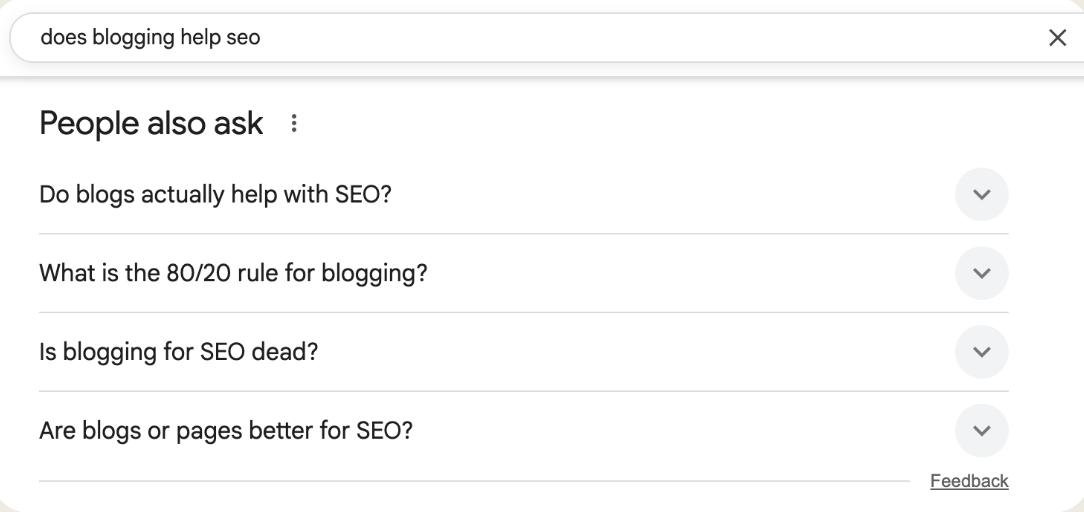
Then use the "People also ask" box to shape your headings, so they match the way people actually phrase the question. Anything you don't cover in the body goes in an FAQ at the bottom.
6. Use your keyword like a human
Google understands synonyms, related phrases and context. You don't need to crowbar your exact keyword into every other sentence to get the little green light in Yoast. Yoast is a tool, not gospel.
What we do instead:
Main keyword in the title, the first 100 words and at least one subheading
Variations everywhere else. If the keyword is "Manchester wedding photographer", you might also use "wedding photography in Manchester" or "natural wedding photos in Manchester".
Then read it out loud. If you trip over a sentence, or you've used the same phrase so often you've started to hate it, cut it back. Your reader will thank you, and so will Google. Same goes for your language.
Use the words your clients actually use, because nobody's searching in corporate robot. The odd bucket brigade helps too: ask the question your reader's thinking, then answer it straight away. Just skip the stock ones like "Here's the thing", which people now clock as AI.
7. Make it skimmable
Most people aren't curled up in bed reading your blog like the next bestseller. They're skimming for the bit that's relevant to them, and if they hit a wall of text, they're gone.
One H1 (your title), then H2s for each section and H3s inside them. Pick heading levels by structure, not by which size looks nicest. Aim for a subheading roughly every 150 words, and make each one worth reading: match the question, then give a skimmer a reason to stop.
Short paragraphs and bullet points. Nobody wants to wade through 10 sentences on their phone. Then add more whitespace. No, more than that. Line breaks between more things. It's ok, you're helping people read it.
Bold the takeaways, sparingly, so a skim-reader still leaves with something.
A lot of images. Screenshots, charts, diagrams, product photos, before-and-afters and marked-up screenshots. Gyazo is my favourite for marking them up. Your own beat generic stock.
8. Add the bit only you could write
This is the step AI can't do for you, and it's the one most posts skip.
Before anything goes live for a client, we run what we call the hot sauce test: could any other business in their niche have published this post? If the answer's yes, it isn't finished.
Add at least one thing nobody else has:
A real client example or result
A number from your own work
An opinion you'd defend in the pub
A mistake you made and what you changed
Google's own guidance for AI search asks for unique, non-commodity content. AI can write the average answer to any question in seconds. The bits it can't find anywhere else are what get you ranked and cited. So start with your own experience, then go to the research. And whatever you do, DON'T BE BORING.
9. Link to your own pages and your sources
Most posts I read either skip links altogether or use dead-end link text like "click here" or "read more". Google's basically like, "Click here to what?" Its own guidelines list both as examples of bad link text.
The test is simple: read the link text on its own. If you can't tell where it goes, rewrite it.
Good: "read our guide on how to create a custom GPT"
Bad: "click here" or "more info"
Internal links. We aim for at least 2 to 3 links to related posts and pages. Google says there's no magic number, but every page you care about should have a link from at least one other page on your site.
External links. Don't be scared of "sending traffic away". Linking to the study, stat or official guidance behind your point makes the post more trustworthy, and Google says as much. If you've got affiliate links for tools you mention, use them and say so.
10. Put a call to action a third of the way down (and at the end)
People spend hours on a brilliant post, then hide the call to action at the very bottom like a shy kid in the corner at the school disco.
Put one about a third of the way down, in a box that stands out, before your reader wanders off to check WhatsApp. Then another at the end. If you've got a lead magnet that fits the post, that's your strongest option. (There's one a third of the way down this post. You scrolled straight past it.)
A blog can turn someone straight into a paying client. One of ours did, to the tune of £14,000. More often, it's the start of the journey:
Blog → lead magnet → email list → nurture → sale.
So don't make people dig for the next step.
Before you hit publish
11. Get the title, meta description and URL right
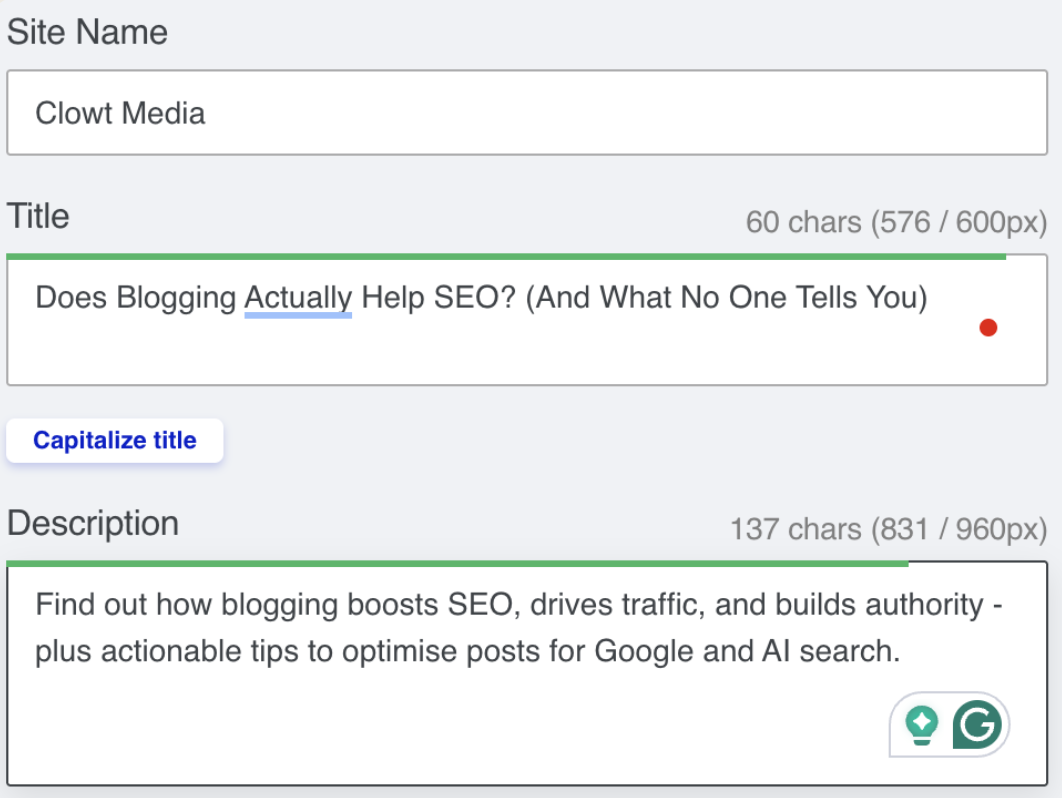
Your title and meta description are what people see in Google before they decide whether to click. Boring, vague or cut off halfway, and they scroll straight past.
Title under 60 characters, or it risks being chopped off
Clear about what they'll get. Clickbait without the payoff gets you a quick bounce.
Target keyword first in the SEO title and meta description
Meta description around 155 characters, written like a mini sales pitch
A number in the title, and brackets where you can. Look at this post's title.
Different from what's already ranking. If page one is all "10 tips", don't be the 11th. Standing out is how you steal clicks from the top 2 results when you're ranking below them.
A short URL. Different from your title, with no numbers and no dates, because you'll add a step or update the year and the URL will be wrong forever. The year can go in the SEO title or meta description instead. This post's is /blog/blog-seo-checklist.
Google doesn't always use yours. It generates its own title link and snippet from a few sources, including your title and meta description, so the closer yours match what the page actually says, the more likely they'll stick.
I check every title and description in the Mangools SERP Simulator before publishing, so I can see exactly how it'll look and avoid the dreaded "…" cut-off.
Stuck for ideas? Google your keyword and look at what's ranking. Don't copy it. Use it to see what clearly works in your niche.
12. Sort your images
Rename every file before you upload it. "IMG_29374.jpg" tells Google nothing. Google's own example prefers "my-new-black-kitten.jpg" over "IMG00023.JPG".
Write alt text for its real job: accessibility. Screen readers use it to describe images to people who can't see them. Google calls alt text the most important information you can give it about an image, and warns against stuffing it with keywords.
Compress it. Big files slow your page down. I run everything through TinyPNG.
Use your own where you can. Screenshots and infographics can get found in Google Images too.
Tip for alt text: upload the image to ChatGPT and ask it to "describe this image in one sentence for alt text, and only use the keyword '[your keyword]' if it fits naturally." Then check it actually describes the image.
After it's live
13. Send it somewhere
A post nobody's seen can't earn links, mentions or enquiries. If you're putting 3 hours into it, slice it up:
Pull 3 or 4 takeaways into an Instagram carousel
Email it to your list as a new resource
Turn one section into a LinkedIn post
Record a short reel on the main point
Know you’ll write the post and never get round to the carousel? Same. I went two years without marketing my own business. On our marketing support retainer, we turn every post into the carousel, the email and the rest, so it actually gets seen.
14. Log it and point links at it
Keep every post in one place: a Google Sheet, Notion, whatever you'll actually open. For each one, note the title, target keyword, publish date, URL and related posts.
Once you've got 10 or more posts, this is a godsend. Adding internal links stops being a scroll through your own blog archive copying URLs one by one, and you can see your content gaps at a glance. It also makes the next job quick: on the day a post goes live, add 5 to 8 internal links pointing to it from your older posts. Start with the ones on the same topic, but don't worry about linking from outside the topic if it makes sense.
It also shows you where to build a cluster. One post on its own doesn't do much for your authority. Five related posts, all linking to each other and to your service page, show Google you're the go-to on that subject.
Example: if you're an online business manager, don't stop at "what does an online business manager do?" Build around it:
How an OBM differs from a virtual assistant
Signs your business is ready for an OBM
OBM pricing: what to expect and how to budget
Systems every OBM will set up in the first 90 days
I use SurferSEO for clustering. It's brilliant, and it is not cheap. If you're not ready to pay for a tool, ChatGPT does a decent job with a prompt like this:
"I'm writing a blog about [main keyword]. Give me at least 10 related blog topic ideas and group them into logical clusters for SEO. Include potential long-tail keywords for each topic."
15. Update it every year
Most people hit publish and never look at a post again. Google wants the best answer to a search, and for anything that dates, that means the current one.
I spend about 10 minutes a year updating one client post we first wrote in 2022. This year it brought in 232,000 impressions in a single month. The full story's in our post on whether blogging helps SEO.
When you update, check for:
Years, prices and stats that have gone out of date
Screenshots of tools that have changed
Questions the post now shows up for in Google Search Console but doesn't answer (add a section or an FAQ for them)
Newer posts you can link to from it
The checklist (save this bit)
Find the questions people are asking (AnswerThePublic, autocomplete, People also ask)
Check the keyword, and don't panic about low volume
Google it in incognito and check what's ranking
Outline your headings before you write
Short intro: tiny sentences, 8 lines max, question answered
Keyword in the title, first 100 words and a subheading; variations everywhere else
One H1, a subheading every 150 words, short paragraphs, more whitespace, lots of images
Add something only you could write, and don't be boring
2 to 3 internal links with descriptive link text, plus links to your sources
Call to action a third of the way down, and again at the end
Keyword first in the title and meta, a number in the title, a short URL with no numbers or dates
Rename images, write alt text, compress
Share it with your list and on social
Log it, then point 5 to 8 internal links at it from older posts
Update it every year
Bonus: check your blog design once
Everything above is per post. This bit's a one-off for your blog template, and most of it comes from the skimmability research I did. [PLACEHOLDER: one line on what the research was and what it found]
Font size of 15px minimum, ideally 18 to 22px. Font size is the number one factor in whether people actually read your content. [PLACEHOLDER: source, or your research finding]
Images aligned the same way all the way down. I prefer centred, but consistency is what matters. A border isn't essential, but it looks much tidier.
Social sharing buttons for the networks your audience actually uses. No point having Twitter and Facebook if most of your people are on LinkedIn.
CTA slots built into the template. One a third of the way down, one at the end, so nobody can forget them.
Or hand the whole thing over
That's the lot. 15 steps, about 3 hours a post, every post.
If that sounds like a good use of your Sunday, save the checklist and crack on. If it sounds like the Sunday scaries with extra steps, this is exactly what we do for clients, from keyword research to the yearly update. You send us the voice notes and we do the rest.
See our blog writing packages or get in touch.
Blog SEO FAQs
How many keywords should one blog post target?
One main keyword, plus the variations and questions around it. If two keywords need genuinely different answers, they're two posts.
Do I need Yoast or an SEO plugin?
No. On WordPress, Yoast is a handy checklist. Squarespace and Wix have the same basic settings (SEO title, meta description, URL) built in. Use whichever you've got, and don't twist your writing out of shape to get a green light.
Can I use AI to write SEO blog posts?
For the boring bits, yes. We use it for research, outlines and first drafts. It can't do step 8, and step 8 is what gets you ranked and cited. Edit hard, and make sure the post says something only you could say.
How long does it take to optimise a blog post?
A new post takes me at least 3 hours from idea to publish. Updating one that's already live can take 10 minutes.
Featured posts